AI Video Editing: What Automation Can Do
AI video editing in Reelora isn't a magic button — it's an assistant that takes over the grunt work: syncing shots to the voiceover, keeping the rhythm, adding transitions and cutting out the excess. You're in charge — automation does the work.
- What is AI video editing and why you need it
- What automation takes care of
- Smart trimming: the AI reads meaning, not sound waves
- Editing your own footage: your shot comes first
- How automatic editing looks in Reelora
- Where AI saves hours and where a human eye is needed
- Questions about AI video editing
What is AI video editing and why you need it
Classic editing is hours of work: laying clips on tracks, fitting each one to the voiceover, evening out the rhythm, typing up subtitles, cutting stumbles and repeats. AI video editing takes that routine off your hands: the algorithm sees where each line starts and ends, knows how long every scene runs, and assembles the video while you focus on content.
In Reelora, the AI video editor isn't a standalone gimmick — it's part of a full studio. First you generate shots or add your own, then run the voiceover — and only after that does automation put everything together: shots synced to the voiceover, rhythm, transitions between scenes. It's not 'one button made the video': you can check and rework every stage.
The main advantage of this approach is control. Any shot can be regenerated or replaced individually without touching the rest of the video. Automation saves hours, but the final word is always yours.
What automation takes care of
Synced to voiceover
Shots land exactly on each line: the voiceover is synced with scenes and subtitles, so nothing has to be moved by hand.
Rhythm and pace
The AI keeps the shot-change pace right for your format — long-form or Shorts — so viewers stay hooked.
Transitions between scenes
Scenes are joined automatically: no black gaps or jarring jumps where they don't belong.
Automatic subtitles
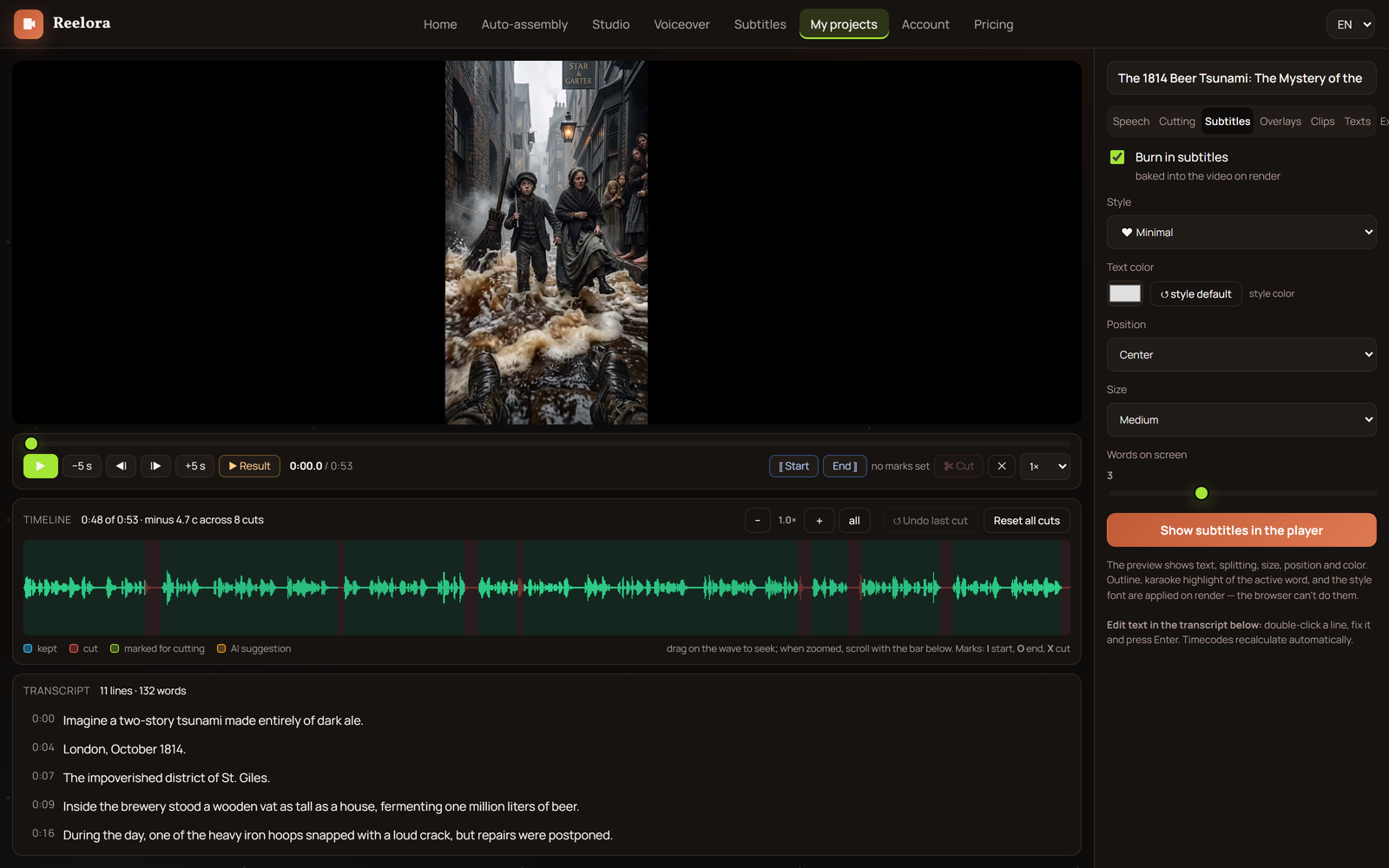
Speech recognition, splitting into lines, styling options and burning subtitles straight into the video.
Smart trimming
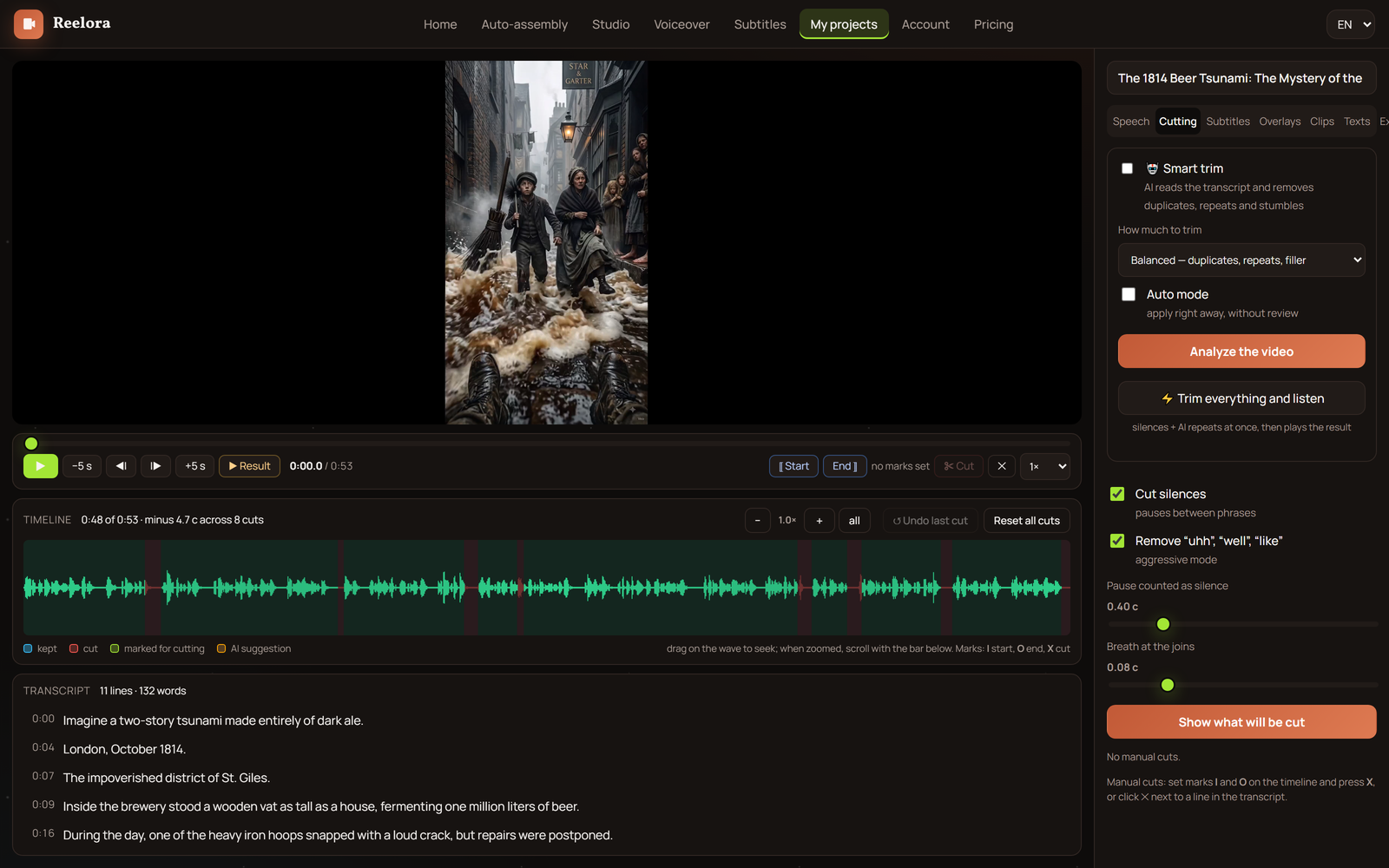
The AI reads the transcript and removes retakes, repeats, stumbles and filler — instead of just cutting silence.
Replace any shot
Don't like a scene? Regenerate it or drop in your own photo or video — the rest of the edit stays untouched.
Smart trimming: the AI reads meaning, not sound waves
Most auto-cutters work primitively: see silence, cut it. Reelora works differently. When trimming, the AI works from the transcript: it sees the text of every line and removes retakes, repeats, stumbles and filler — words and phrases that carry no meaning.
This matters most if you record long talking videos, podcasts or tutorials: raw footage turns into a tight video without manually combing through the timeline. For more on how it works, see the smart trimming guide.
Editing your own footage: your shot comes first
A common myth about AI video editing is that it only works with generated shots. Not in Reelora: at any point you can add your own photos or videos instead of generated ones. Shot something on your phone? Upload it, and automation will sync it to the voiceover just like generated scenes.
The workflow is simple: if you already have footage that needs cutting to a voiceover, just swap the shots for yours and hit edit. And if the AI refuses to animate some static photo because of moderation or a tricky frame, you can layer effects and overlays on top to turn it into video.
For all the ways to work with your own files, see the own footage section.
How automatic editing looks in Reelora
Describe your topic or paste your script
The AI builds the skeleton of your future video: prompts for voiceover, references, photos and videos — each in its place. You can edit the skeleton by hand or copy it into your own trained AI and paste it back ready-made.
Generate shots or add your own
Run generation with one click or step by step for more control. Any slot can be swapped for your own photo or video.
Voice the lines
Pick an ElevenLabs voice and language — Ukrainian included. The voiceover syncs instantly with scenes and subtitles.
Hit edit
Automation will sync the shots to the voiceover, keep the rhythm and add transitions between scenes.
Add subtitles and trim the excess
Turn on automatic subtitles, style them however you like, and if needed run smart trimming — it'll remove repeats and stumbles.
Review and replace anything you don't like
Any shot can be regenerated on its own, without rebuilding the whole video. The final version gets your sign-off, not the algorithm's.
Where AI saves hours and where a human eye is needed
Automation saves the most time on routine: laying clips on tracks, fitting them to the voiceover, subtitles, cutting repeats. That's mechanical work where the algorithm beats any editor. Plus batch generation: you can queue up a whole batch of tasks and shut down your computer — everything renders on Reelora's servers, and the results will be waiting in your project.
But there are places where a human eye is irreplaceable. Generated shots are still weak on hands, on-screen text, long continuous scenes and accurate physics — those moments need catching and regenerating. Story logic, facts and the overall sense of 'does this video actually work' are also things nobody will check for you.
So the working strategy is this: automatic editing lays the foundation, and you spend time not on routine but on taste — picking the best takes, tweaking accents, doing the final pass. For anyone publishing content at scale — channels, agencies, faceless projects — it's the difference between one video per evening and a steady stream of releases. If you want to start even earlier — with the shots themselves — check out the AI video generator overview.
Questions about AI video editing
Can I edit a video entirely from my own footage?
Yes. Upload your photos and videos, swap them into any slots in the project — and hit edit. Automation will sync your footage to the voiceover just like generated content.
What exactly does smart trimming remove?
Retakes, repeats, stumbles and filler. The AI works from the transcript, so it sees what each line means rather than just audio levels — it doesn't mechanically cut silence.
Are subtitles synced with the voiceover?
Yes. ElevenLabs voiceover syncs automatically with scenes and subtitles, so lines, audio and text never drift apart.
Can I replace one shot without rebuilding the whole video?
Yes, any shot can be regenerated or replaced individually — the rest of the edit stays in place.
Do I need editing experience to use Reelora?
No. The basic path is simple: topic, shots, voiceover, edit button. Experience only helps with final taste-level polish.
What video formats does automatic editing support?
Both long-form and Shorts. You pick the format at the start, and the AI keeps the matching rhythm — livelier for vertical videos, calmer for long ones.
How much time does AI video editing save?
It depends on the material, but the routine — laying out shots, subtitles, cutting repeats — is fully handled by automation. You're left with just review and taste-level tweaks.
See also
Build your video in Reelora
Generate shots or upload your own, run the voiceover — and let automation edit the video for you. You only pay for what's actually generated.
Open the Reelora studio