AI Builds Your Video Blueprint: Long Videos and Shorts in Reelora
Describe your topic and get a ready-made video blueprint with voiceover, reference, photo and video prompts. Then either one button, or step-by-step control over every scene.
A mode that starts with the script, not the shot
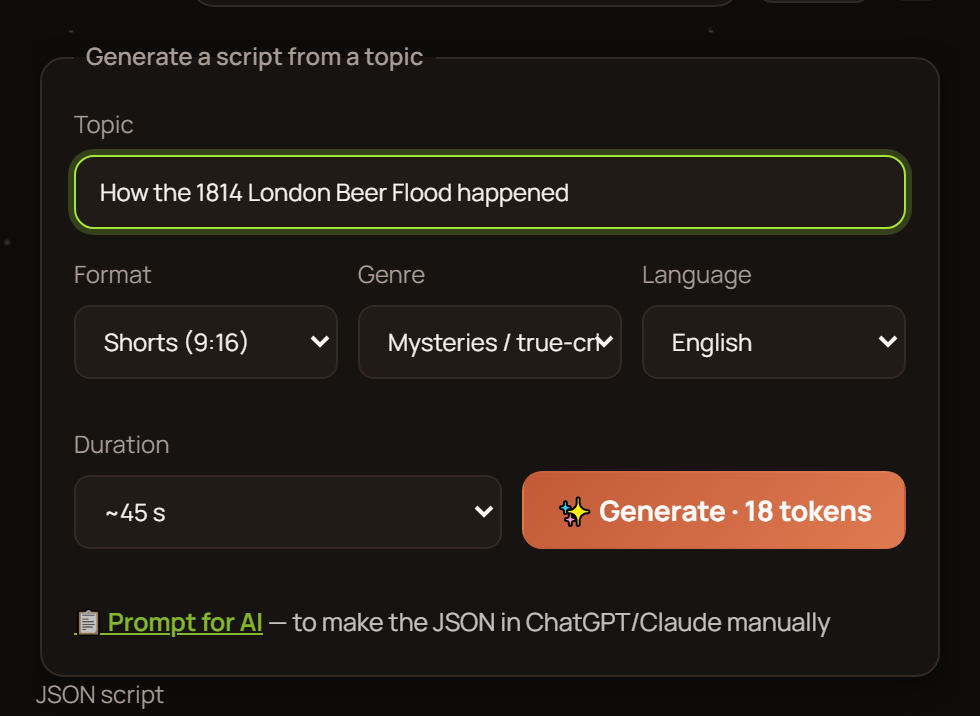
Most generators spit out short clips, and assembling the video is your problem. In Reelora it's the other way around: you pick an approximate length, long or short format, a topic and a language — and the AI returns a complete video blueprint. Inside, voiceover prompts, reference prompts, photo and video prompts are already laid out, each in its place in the structure.
Essentially, you get an AI video script that's ready for generation right away: no need to write the text yourself, hunt down prompts for every scene, or keep the structure in your head. Want to create a short for TikTok or Reels? Pick the vertical format, and the blueprint will be built around it.
If you're comparing different generation approaches, there's a broad overview in our AI video generator article. Here we go deep on the flagship long-video mode.
- Length, format, topic and language — four parameters to start
- The blueprint includes prompts of every type: voiceover, references, photos, video
- Launch with one button or step by step, controlling each stage
How to create a long video or short: step by step
Pick your parameters
Approximate length, format — long or short — and voiceover language. That's enough for the AI to understand the scale of the task.
Describe your topic
Write what the video is about and who it's for. One paragraph is fine; the more specific, the more accurate the scene structure will be.
Get your blueprint
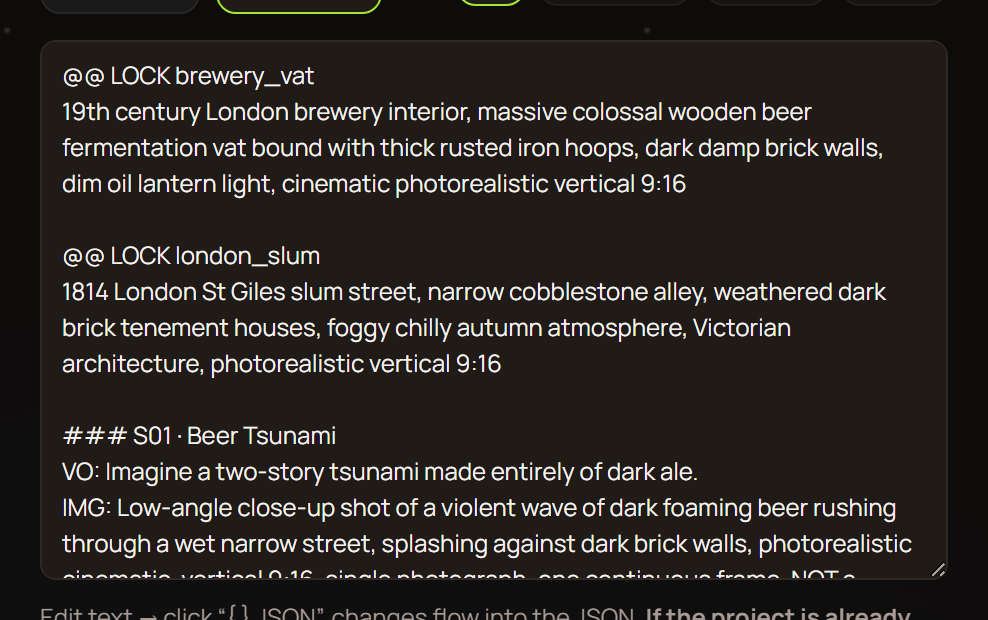
The AI returns the video blueprint: a sequence of scenes, voiceover prompts, reference prompts, photo and video prompts. Every element is already in its place.
Review and tweak
The blueprint is your draft. Rewrite any prompt, remove an extra scene, or add one of your own.
Start generating
One button kicks off generation of everything according to the script. Or go step by step: first the voiceover, then the shots — approving each stage.
Get your finished video
Shots are assembled to the voiceover, subtitles get synced, transitions are set. What comes out is a fully assembled AI long video, not a pile of clips.
What's already inside the blueprint
Voiceover prompts
Text for the ElevenLabs voice, split into lines for each scene. The voiceover syncs with shots and subtitles with no manual tweaking.
Reference prompts
Anchor descriptions so characters and style don't drift from scene to scene. Especially important for series content and recurring characters.
Photo prompts
Static shots are generated via Nano Banana or Nano Banana 2 / Pro — you pick the model in the interface.
Video prompts
Scenes with motion are generated in Veo 3. Where animation is needed and where a static photo is enough — the AI sorts that out itself, and you can adjust it.
One button or step by step: you choose the level of control
The first path is one button. Press it, and generation of everything runs on its own: voiceover, shots, assembly. Fast and convenient when the topic is simple or you want to see the whole video at once and make edits later.
The second path is step-by-step generation. Every stage goes through you: you approve the voiceover, then the shots, then the final assembly. Slower, but you catch problems before they end up in the finished video.
At any point, a generated shot can be replaced with your own photo or video — for example, embedding your own footage right into the AI video. More on that in our article on working with your own footage. A bad shot can be regenerated separately, without restarting the whole project.
The blueprint works with your own AI too
If you already have a trained AI assistant that knows your formats and style, the prompt blueprint fits easily into that workflow. Copy it and feed it to your assistant — it already knows the structure, so it will return a ready script in the right format.
Paste the answer back into Reelora — and everything falls into place: voiceover, reference, photo and video prompts are distributed across scenes, nothing gets lost. Handy when you run several projects and want to keep scripts in one place.
And if you're just learning to write prompts manually, the basics are collected in our guide on how to make an AI video.
Who benefits most from this mode
Channel owners. One blueprint scales into a whole series of episodes: change the topic and you get a new AI video script using the same scheme. Regular publishing stops depending on inspiration. More in our article for channels.
Faceless channels are a special case: the blueprint covers the entire cycle from voiceover text to subtitles — no camera or editor needed.
Businesses also use the mode for training videos and presentations, as well as editors who need to generate missing shots to complement their filmed material.
FAQ about the long-video mode
How is a blueprint different from a regular script?
A blueprint is an AI video script already broken down into prompts: voiceover, references, photos, video. You can launch generation right away, with no rewriting for different tools.
How long does it take to generate an AI long video?
Generation runs on Reelora servers: you can set the task and shut down your computer — the result will be waiting in your project. Timing depends on the video length and the number of scenes.
Can I create a short with the same blueprint as a long video?
Format is set at the start, and the AI builds the structure for vertical or horizontal right away. To create a short, pick the appropriate format before generating — and the blueprint will be built around it.
What if a shot turns out badly?
Regenerate or replace it separately — the rest of the video stays intact. Instead of a generated shot, you can drop in your own photo or video.
What languages can the voiceover be in?
Whatever language you pick when creating the blueprint. Voiceover runs on ElevenLabs voices, and Ukrainian is among the available languages.
Can I write the script in my own AI instead of Reelora?
Yes. Copy the prompt blueprint into your trained AI — it knows the structure and will return the script in the right format. Paste the answer back into Reelora, and the prompts will be distributed across scenes.
What weak spots should I keep in mind?
AI still struggles with hands, on-screen text, long continuous scenes and accurate physics. That's why the blueprint splits the video into short scenes, and any bad shot can always be regenerated or replaced with your own.
How much does generation cost?
Reelora works on a pay-as-you-go model: you only pay for what's actually generated. See current prices on the pricing page.
See also
Describe your topic — Reelora handles the rest
Pick a format and length, get a video blueprint with ready-made prompts, and start generating. Create AI long videos or shorts — and publish content regularly.
Open the Reelora studio