A Voice That Carries the Video: ElevenLabs Voiceover in Reelora
Text-to-speech in Reelora runs on ElevenLabs voices: pick the timbre, pace and pauses — while scenes, editing and subtitles adjust to the voice. Ukrainian is supported out of the box.
The Voice Is Half the Video
A bad shot is easy to regenerate. But a boring or robotic voice drags down the whole video: viewers drop off by the tenth second, even if the visuals are flawless. That's why in Reelora text-to-speech isn't a checkbox in the settings — it's the foundation around which the entire video comes together.
We built ElevenLabs right into the studio. No need to generate audio in a separate service, upload files, or manually check timing: you write the text — an AI voice reads it — and then automation takes over the routine. Everything happens in your browser; nothing to install.
Pricing is transparent: pay-as-you-go means you only pay for the voiceover actually generated. ElevenLabs in Reelora has some of the lowest prices on the market, and you can always check the current figures in the pricing section of the site.
What You Control in the Voiceover
Voice Selection
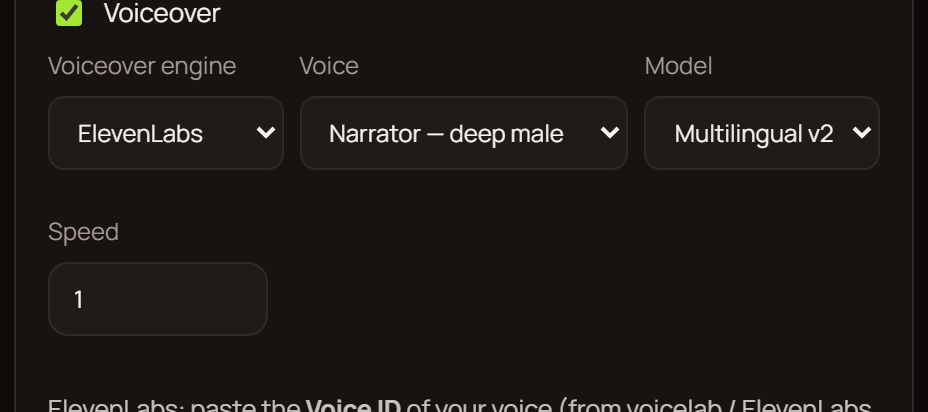
Pick a timbre from the list of available ElevenLabs voices — matching your format and delivery style: calm narration for long-form or an energetic tone for shorts.
Pace
Speed up or slow down the reading so the rhythm of the voiceover matches your edit's tempo and the mood of each scene — without sounding rushed.
Pauses
Place pauses between sentences and paragraphs: the text breathes, accents land, and viewers keep up with the thought. Especially important for educational formats.
Languages
Many languages to choose from, including Ukrainian. One script — different audiences, no rewriting or hunting for voice actors.
The Voiceover Becomes the Backbone of Your Video
Once the voice is ready, it sets the rhythm for the entire video. Automatic syncing adjusts shots to the length of each line: a longer phrase gets a longer scene, a short one gets a quicker cut. That's the difference between a pile of clips and a finished video.
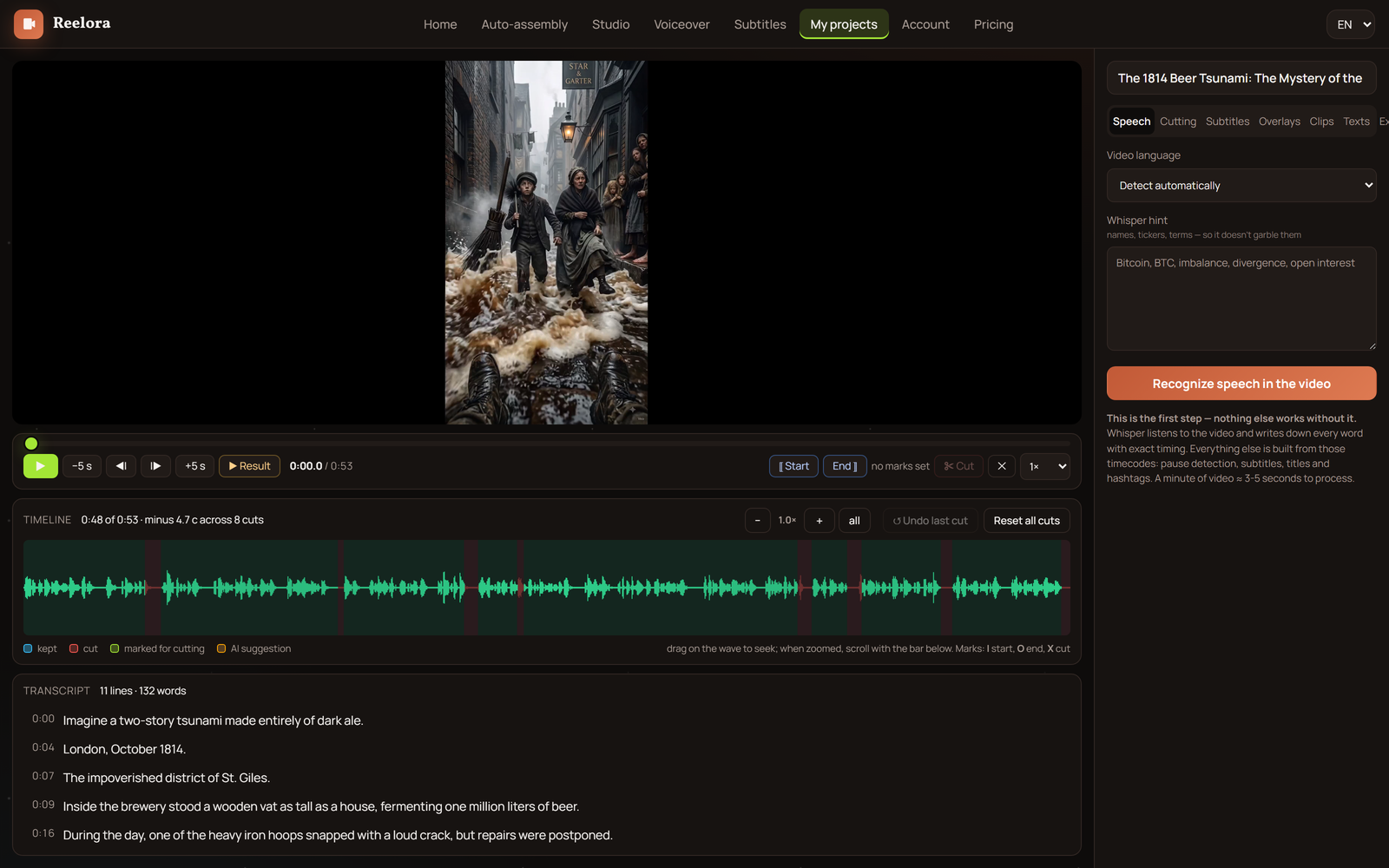
Subtitles grow out of the voiceover too: the system recognizes the speech, splits it into lines, and syncs them with the picture. How to style them and embed them in the video is covered in detail in our automatic subtitles guide.
It works both ways: any shot can be regenerated or replaced with your own without touching the rest. The voiceover stays in place, while the edit and subtitles adjust to the new footage.
- Longer line — the scene holds longer.
- Short phrase — quick cut and more dynamics.
- Swapped a shot — sync updates automatically.
How to Do Text-to-Speech in Reelora
Write or Generate the Script
Type in your voiceover script or grab a ready-made framework — the AI video creation guide walks you through making videos step by step.
Pick a Voice and Language
In the ElevenLabs voice list, find a timbre that fits your format and set the language — including Ukrainian.
Adjust Pace and Pauses
Preview a fragment before generating: the rhythm should match your vision, and the pauses should highlight key points. That way the text sounds alive instead of like flat reading.
Run TTS Generation
The AI voice reads the text, and the studio instantly attaches the audio to your project timeline.
Assemble the Video
Editing fits scenes and subtitles to the voiceover. Don't like something? Fix it surgically: a shot, a line, or the subtitles individually.
ElevenLabs in Ukrainian and Many More Languages
For creators working in Ukrainian, one question always matters most: does the synthesized speech sound alive? ElevenLabs reads Ukrainian naturally — with proper intonation, none of that 'robot reading from a dictionary' feel. For faceless channels and educational videos where the voice is the only host, this is essential.
Besides Ukrainian, many other languages are available. The same script can be voiced for different countries and platforms without rewriting the text. Especially handy when you run channels aimed at different audiences.
If you're planning a series of videos from one framework, start with the long-form video and shorts mode: voiceover prompts are already in place within the script, and all you have to do is pick a voice.
Questions About Voiceover in Reelora
Can I turn text into speech in Ukrainian?
Yes. ElevenLabs in Reelora supports many languages, including Ukrainian — the voice reads text naturally, with lively intonation. The range of timbres helps you find the right delivery for your format.
What is TTS in simple terms?
TTS (text-to-speech) is technology that converts written text into speech. You enter a script, and an AI voice reads it aloud.
How much does ElevenLabs voiceover cost?
Pay-as-you-go applies: you only pay for the voiceover actually generated. ElevenLabs in Reelora has some of the lowest prices on the market — check the current figures in the pricing section of the site.
Can I change the voice after generation?
Yes. The studio's principle is surgical edits: pick another voice, regenerate the voiceover, and the sync with scenes and subtitles updates automatically.
Does voiceover work with my own videos?
Yes. Upload your footage, and the editor cuts it to fit the voiceover — exactly like with generated scenes. No manual reassembly needed.
How is voiceover in Reelora different from a standalone TTS service?
You don't get a bare audio file — you get a finished video: text-to-speech instantly becomes the backbone of the edit, while subtitles and scenes adjust to it automatically.
Which languages are available besides Ukrainian?
Many popular languages for different platforms and countries. You'll see the full up-to-date list in the dropdown when selecting the voiceover language.
See also
Give Your Video a Voice
Pick an ElevenLabs voice, paste your script — and Reelora will assemble the scenes, edit and subtitles itself.
Create a Video with Voiceover